Showing posts with label စာအုပ္. Show all posts
Showing posts with label စာအုပ္. Show all posts
Saturday, July 21, 2012

Friday, March 30, 2012
The Guide to Basic HTML
ဒီတစ္ခါေတာ့ ဘေလာ့ဂါမ်ားအတြက္ ရည္ရြယ္ၿပီး basic html လမ္းညႊန္ခ်က္ေလးကို တင္ေပးလိုက္ပါတယ္။ အေျခခံအဆင့္ျဖစ္သည့္ အတြက္ စၿပီးေလ့လာသူမ်ားအတြက္ေတာ့ အဆင္ေျပမွဳရွိပါတယ္။ ျမန္မာလို ရွင္းျပထားတဲ့အတြက္ ပိုၿပီး နားလည္ရွင္းလင္းမွဳလည္း ျဖစ္ပါတယ္။ အေျခခံဆိုသည့္အတိုင္း အေျခခံ သေဘာတရားမ်ားသာ ရွင္းျပထားတာျဖစ္ပါတယ္။ အားလံုးကို ျမန္မာလို ရွင္းျပထားတဲ့အတြက္ေရာ.. နမူနာ ေရးထားတဲ့ sample html ေတြေရာ ပါတဲ့အတြက္ ေလ့လာႏိုင္ေအာင္ မွ်ေ၀ေပးျခင္းသာ ျဖစ္ပါတယ္။
က်ေနာ္ ေဒါင္းလုပ္လင့္ ႏွစ္ခု ကေန တင္ေပးထားတဲ့အတြက္ အဆင္ေျပရာကသာ ယူသြားလိုက္ပါခင္ဗ်ာ

USAUPLOAD
ZIDDU
Ref: ခပ္ညံ့ညံ့မွ်ေဝမႈမ်ား
Saturday, May 14, 2011
Windows xp ျမန္ျမန္သံုးမယ္ - (၂)
Original writer ~ သံလံုငယ္
လက္ရိွအသံုးျပဳေနတဲ႔ ၀င္းဒိုးကို (အခုမွ တင္လိုက္တာပဲျဖစ္ျဖစ္၊ သံုးတာၾကာေနၿပီပဲျဖစ္ျဖစ္) မလိုအပ္တဲ႔ လုပ္ေဆာင္မႈေတြ ျဖဳတ္ပစ္ၿပီး မိမိကြန္မ်ဴတာကို performance တိုးလာေအာင္ လုပ္ၾကည္႔တာပါ။ တကယ္ျမန္လား မျမန္လား ကိုယ္တိုင္စမ္းသပ္ၾကည္႔ေပးပါဦး။ အခုလုပ္မွာက မလိုအပ္တဲ႔ လုပ္ေဆာင္မႈ ေတြ ကို disable လုပ္ထားၿပီး RAM စားသက္သာေအာင္ လုပ္တာျဖစ္လို႔ အႏၱရာယ္ကင္းပါတယ္။

၁။ ေအာက္က registry ဖိုင္ႏွစ္ခုကို run ေပးပါ။ windows ရဲ႕ ပံုမွန္လုပ္ေနတဲ႔ အလုပ္ေတြကို safe ျဖစ္တဲ႔ အျမန္ဆံုး Value ေျပာင္းေပးဖို႔ပါ။ (rar ဖိုင္နဲ႔ ခ်ဳံ႕ထားတာပါ။ ျဖည္လိုက္ရင္ reg ဖိုင္ရလိမ္႔မယ္။ Double-click ႏွိပ္ေပးလုိက္ပါ)
Download link ~ Restore Default Settings
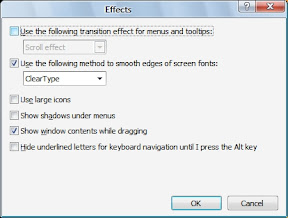
၂။ Desktop ေပၚမွာ Right-click လုပ္ၿပီး Properties ကို ႏွိပ္ေပးပါ။ ၿပီးရင္ Appearance tab ထဲက Effects uncheck လုပ္ေပးပါ။ (uncheck လုပ္ရမွာေတြကို အနီနဲ႔ျပၿပီး check လုပ္ရမွာေတြကို အျပာနဲ႔ျပပါ႔မယ္)
a.) Use the following transition effect for menus & tooltips.
b.) Show shadows under menus. ကိုႏွိပ္ပါ။ ေအာက္မွာ ေရးေပးထားတဲ႔ functions ႏွစ္ခုကို
၂။ Desktop ေပၚမွာ Right-click လုပ္ၿပီး Properties ကို ႏွိပ္ေပးပါ။ ၿပီးရင္ Appearance tab ထဲက Effects uncheck လုပ္ေပးပါ။ (uncheck လုပ္ရမွာေတြကို အနီနဲ႔ျပၿပီး check လုပ္ရမွာေတြကို အျပာနဲ႔ျပပါ႔မယ္)
a.) Use the following transition effect for menus & tooltips.
b.) Show shadows under menus. ကိုႏွိပ္ပါ။ ေအာက္မွာ ေရးေပးထားတဲ႔ functions ႏွစ္ခုကို
၃။ My Computer မွာ Right-click လုပ္ၿပီး Properties ကိုႏွိပ္ပါ။ (Shortcut key ... Win+Pause/Break )
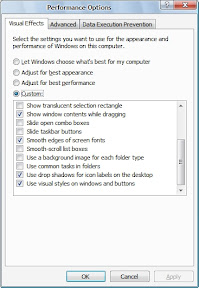
Advanced tab ထဲမွာ Performance section ေအာက္က Settings ကိုႏွိပ္လိုက္ပါ။
Visual Effects tab ထဲက မလိုအပ္တာေတြ Disable လုပ္ပစ္မွာျဖစ္ပါတယ္။ Custom ကိုႏွိပ္ၿပီး ေအာက္က ငါးခု ထားခဲ႔ပါ။ က်န္တာ disable ေပးလိုက္ပါ။
a.) Show window contents while dragging
b.) Smooth edges of screen fonts
c.) Use common tasks in folders
d.) Use drop shadows on icon labels on the desktop
e.) Use visual styles on windows and buttons
၄။ Tools - Folder Options က View tab click ပါ။ ေအာက္ပါ Options မ်ားကို ျဖဳတ္ေပးပါ။
a.) Automatically search for network folders & printers.
b.) Display file size information in folder tips.
c.) Display simple folder view in Explorer's Folders list.
d.) Show encrypted or compressed NTFS files in color.
e.) Show pop-up description for folder and desktop icons.
f.) Use simple file sharing.

၅။ RUN ထဲမွာ msconfig လို႔ ရိုက္ထည္႔ၿပီး။ Start up ထဲက မလိုအပ္တာေတြ Disable ေပးလိုက္ပါ။ က်ေနာ္ကေတာ႔ Disable All ပဲ ေပးလိုက္တယ္။ Kaspersky လို Anti ေတြက သူ႔ဘာ သာ ျပန္ check လုပ္ေပးေပမယ္႕ NOD 32 လိုေကာင္ေတြက ကိုယ္ျပန္ဖြင္႔ေပးမွ Start up ျပန္ျဖစ္ပါ တယ္။ VGA driver ေတြကိုလည္း disable ေပးလိုက္တာ ပိုေကာင္းပါတယ္။ (၀င္းဒိုးအတြက္ လိုအပ္ တဲ႔ driver က System 32 ထဲေရာက္ၿပီးသားပါ။ Start up ထဲပါေနတာက သူ႔ရဲ႕ အျခား performance ေတြျဖစ္ပါတယ္ ) Disable All ေပးလိုက္လို႔ ျပႆနာ တက္သြားမွာ မရိွပါဘူး။
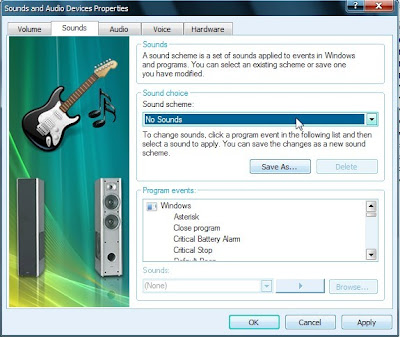
၆။ Control Panel ထဲက Sound & Audio Devices ကိုဖြင္႔ပါ(or type mmsys.cpl in RUN)။ Sounds tab ထဲမွာ No Sounds ေပးလိုက္ပါ .. Sound Scheme section ထဲမွာ ရိွပါတယ္။ အားလံုးမျဖဳတ္ခ်င္ဘူး အသံေလးေတြ Alert ေလးေတြ ႀကိဳက္တယ္ဆိုရင္ေတာ႔ ထားႏိုင္ပါတယ္။ ဒါေပမယ္႔ ေအာက္က ေလးခုကိုေတာ႔ No sound ေပးထားသင္႔တယ္။
Exit Windows, Start Windows, Windows Logoff, Windows Logon
(က်ေနာ္ေျပာခဲ႔သလိုေပါ႔ ... အသံပါမွ ႀကိဳက္တယ္ဆိုရင္ေတာ႔ ထားႏိုင္ပါတယ္။ မိမိအဆင္ေျပဖို႔က အဓိကပါ။ အရမ္းႀကီး ေလးသြားတာမွ မဟုတ္တာေလ)
အားလံုးအဆင္ေျပလြယ္ကူမယ္ထင္ပါတယ္။ အခုမွ စဖတ္တဲ႔လူေတြလည္း က်ေနာ္ေျပာတဲ႔ေနရာေတြ ရွာေတြ႔ၾကမယ္ထင္ပါတယ္။ အဆင္ေျပၾကပါေစ ..
ဆရာဦးေဇာ္လင္းေရးတဲ့ ကြန္ပ်ဴတာအေၾကာင္း အေသးစိတ္သိစရာ (Computer in Details)
 စာေရးသူ :>> ဆရာဦးေဇာ္လင္း (Youth Computer)စာအုပ္အမည္ :>> ကြန္ပ်ဴတာအေၾကာင္း အေသးစိတ္သိစရာ ဆုိတဲ့ စာအုပ္ေလးပါ ..
ကြန္ပ်ဴတာအေၾကာင္း အေသးစိတ္သိလုိသူမ်ားအတြက္ပါ .. ဘယ္စာအုပ္ပဲျဖစ္ျဖစ္ ကုိက သိသလုိလုိရွိေပမယ့္ တစ္ကယ္ဖတ္ၾကည့္မွ မသိေသးတဲ့ အေၾကာင္းေတြ ျဖစ္ေနတတ္ပါတယ္ . ေအာက္မွာ အဆင္ေျပတဲ့ Link ကေန Download လုပ္ယူလုိက္ပါ ...
Download megaupload ၊ Download ifile.it ၊ Download rapidshare ၊ Download mediafire ၊ Download 4 shared ၊ Download nyinaymin.net ၊
PHPBB (ဖုိရမ္တစ္ခု တည္ေဆာက္ျခင္း)
php: php အေၾကာင္းျမန္မာလို႔ေရးထာတာမ်ားမရိွဘူလားခင္ဗ်ား ဒါမွမဟုတ္ အသံုးျပဳပံုေျပာျပပါလားခင္ဗ်ား
 ကုိယ္ပုိင္ ဖုိရမ္ တစ္ခုတည္ေဆာက္ျခင္းကုိ ကုိဖုိးလျပည့္ေရးေပးထားတဲ့ မူရင္းအတုိင္း ျပန္တင္ေပးလုိက္ပါတယ္ .. ျမန္မာလုိေရးထားတာ ျဖစ္တဲ့အတြက္ အားလုံးပဲ လုပ္ႏုိင္ၾကလိမ့္မယ္လုိ႔ ေမွ်ာ္လင့္ပါတယ္ . စိတ္၀င္စားသူမ်ားအတြက္ပါ ..
Download ifile.it ၊ Download megaupload ၊ Download rapidshare ၊ Download 4shared ၊ Download nyinaymin.net ၊ Download mediafire
 ကုိယ္ပုိင္ ဖုိရမ္ တစ္ခုတည္ေဆာက္ျခင္းကုိ ကုိဖုိးလျပည့္ေရးေပးထားတဲ့ မူရင္းအတုိင္း ျပန္တင္ေပးလုိက္ပါတယ္ .. ျမန္မာလုိေရးထားတာ ျဖစ္တဲ့အတြက္ အားလုံးပဲ လုပ္ႏုိင္ၾကလိမ့္မယ္လုိ႔ ေမွ်ာ္လင့္ပါတယ္ . စိတ္၀င္စားသူမ်ားအတြက္ပါ ..
Download ifile.it ၊ Download megaupload ၊ Download rapidshare ၊ Download 4shared ၊ Download nyinaymin.net ၊ Download mediafire
မ်ိဳးသူေရေရးသည့္ ကြန္ပ်ဴတာမွ ကြန္ယက္ဆီသုိ႔ (ျမန္မာလုိ)
 မ်ိဳးသူေရေရးသည့္ ကြန္ပ်ဴတာမွ ကြန္ယက္ဆီသုိ႔ စာအုပ္ပဲျဖစ္ပါတယ္ . အင္တာနက္ ခ်ိတ္ဆက္ပုံ ခ်ိတ္ဆက္နည္းကုိ အေသးစိတ္ ေရးထားတာျဖစ္လုိ႔ ေလ့လာသင့္တဲ့ စာအုပ္ေလးပါ . ႏုိင္ငံျခားေရာက္ေနတဲ့ သူေတြအဖုိ႔ေတာ့ အရမ္းကုိ လုိခ်င္ေနတဲ့ စာအုပ္တစ္အုပ္ပါပဲ ..
Download ifile.it ၊ Download mediafire ၊ Download megaupload ၊ Download rapidshare ၊ Download nyinaymin.net ၊ Download 4
Advanced Digital Photography (ျမန္မာလုိ)
 အဆင့္ျမင့္ ဒစ္ဂ်စ္တယ္ ဓါတ္ပုံ႐ုိက္နည္း စာအုပ္ေလးကုိ ျမန္မာလုိ ေတြ႔တာနဲ႔ ျပန္တင္ေပးလုိက္ပါတယ္ . ဓါတ္ပုံပညာ ဆုိတာဟာလည္း သိပ္ေတာ့ မလြယ္ကူပါဘူး . သူ႔မွာလဲ သေဘာတရားေတြ အမ်ားႀကီးရွိပါတယ္ . သိခ်င္ရင္ေတာ့ ဒီစာအုပ္ေလးကုိ ဖတ္ၾကည့္လုိက္ပါ .. အဆင္ေျပႏုိင္မယ္လုိ႔ ေမွ်ာ္လင့္ပါတယ္ ..@nyinaymin
ေအာက္မွာ Download လုပ္လုိက္ၾကပါဦး .
Download ifile.it ၊ Download mediafire ၊ Download multiupload
window မတင္တတ္သူမ်ားအတြက္ (ျမန္မာလုိ)
 ကၽြန္ေတာ္ window မတင္ တတ္သူမ်ားအတြက္ ရည္ရြယ္ၿပီး စာအုပ္ေလး တစ္အုပ္ တင္ေပးလုိက္ပါတယ္ . ကၽြန္ေတာ္ လုပ္ထားတာေတာ့ မဟုတ္ပါဘူး . ညီေလး တစ္ေယာက္ ေမးလ္နဲ႔ ပုိ႔ေပးလုိက္လုိ႔ပါ .
Download ifile.it ၊ Download mediafire ၊ Download multiupload
A+ pc hardware (ၿမန္မာလို)
 ဒါက ဆရာ မ်ိဳးသူရ ရဲ႕ A+ စာအုပ္ပါ ။ အဓိက ေရးထားတာက အေျခခံရယ္၊
hardware ထိန္းသိမ္း နည္း ရယ္ပါ ။ အဆင္ေျပတဲ့ Link ကေန download ဆဲြ ၾကပါ ... ကြ်န္ေတာ္လည္း ေလ့လာဆဲပါ ခင္ဗ်ာ ... ဒီ blog မွာ ေရးသားခြင့္ၿပဳတဲ ့ ကိုညီေနမင္း ကိုလည္း အထူး ေက်းဇူးတင္ပါတယ္ ခင္ဗ်ာ ...
Download mediafire
video တည္းျဖတ္ေရးအတြက္ Ulead Video Studio 6 (ျမန္မာလုိ)
 ဒါကေတာ့ video editing စာအုပ္ေလးပါ . ဟုိတစ္ေလာက ေတာင္းဆုိထားတဲ့ ညီေလးအတြက္ တင္ေပးလုိက္ပါတယ္ . အားလုံးပဲ အဆင္ေျပၾက လိမ့္မယ္လုိ႔ ေမွ်ာ္လင့္ပါတယ္ . ျမန္မာလုိ ေရးထားတာ ေလးပါ. video editing သမားမ်ားအတြက္ အေတာ္ေလး ေကာင္းမြန္ပါတယ္ . ေလ့လာၾကည့္လုိက္ပါ . လုိခ်င္သူမ်ား ေအာက္မွာ Download လုပ္ယူလုိက္ပါ .@nyinaymin
up4vn.com | Rapidshare | Megaupload | Depositfiles | Mediafire | Ifile.it | Hotfi
အဂၤလိပ္စာေလ့လာခ်င္သူမ်ားအတြက္
ဒီပုိ႔ကေတာ့ အဂၤလိပ္စာေလ့လာခ်င္သူမ်ားအတြက္ သီးသန္႔ပါ ...
ဒီစာအုပ္ကေလးကေတာ့ အေတာ္ေလးကုိေကာင္းပါတယ္...
Author: Bergen Evans, Cor.Nelia Evans
Publisher: Random House. New York
Pages: 574
Excerpt: When we speak or write we want to be understood and respected. We want to convey our meaning and we want to do it in a way that will command admiration. To accomplish these ends we must know the meanings of words, their specific meanings and their connotations, implications and overtones, and we must know how to combine words effectively into sentences. A dictionary can help us to understand the meaning of a word. But the only way to understand a word fully is to see it in use in as many contexts as possible. This means that anyone who wants to improve his vocabulary must read a great deal and must make sure that he understands what he reads. There is no short cut to this kind of knowledge. If a man thinks that noisome and noisy are synonyms, if he uses focus and nexus interchangeably, if he sees no difference between refute and deny and if he assumes that disinterested means uninterested, he will not say what he means. Indeed, he may even say the exact opposite of what he means. Respectable English is a much simpler matter. It means the kind of English that is used by the most respected people, the sort of English that will make readers or listeners regard you as an educated person.
ကြ်န္ေတာ္တို႔ အဂၤလိပ္စကားေျပာဆိုရာတြင္လည္ေကာင္း၊ ေရးသားရာတြင္လည္းေကာင္း၊ ဆိုလိုရင္းကို သူတစ္ပါး နားလည္ေအာင္ႏွင့္အဓိပၸယ္မလြဲေအာင္ေရးသားရပါတယ္။ ထိုသို႔ေရးသားရာတြင္စကားလံုးတစ္လုံးခ်င္းစီ၏ အဓိပၸယ္ႏွင့္ဆိုလိုရင္း၊ အသံုးအႏႉံဳးကိုသိထားရပါမယ္။ ဥပမာ၊ uninterested သည္ "စိတ္မ၀င္စားေသာ" ဟုဆိုလိုေသာ္လည္း၊ disinterested သည္ "ဘက္မလိုက္ေသာ၊တရားမွ်တေသာ" လို႔ဆိုလိုပါတယ္။ ဤစာအုပ္တြင္စကားလံုးတစ္လံုးခ်င္းစီ၏ အဓိပၸယ္ႏွင့္ဆိုလိုရင္း၊ အသံုးအႏႉံဳးစသည္တို႕ကိုေသခ်ာစြာ႐ွင္းလင္းျပထားပါတယ္။
download လုပ္ခ်င္ရင္ေတာ့ ဒီမွာ လုပ္ႏုိင္ပါတယ္ ...@nyinaymin
ဒီစာအုပ္ကေလးကေတာ့ အေတာ္ေလးကုိေကာင္းပါတယ္...
Author: Bergen Evans, Cor.Nelia Evans
Publisher: Random House. New York
Pages: 574
Excerpt: When we speak or write we want to be understood and respected. We want to convey our meaning and we want to do it in a way that will command admiration. To accomplish these ends we must know the meanings of words, their specific meanings and their connotations, implications and overtones, and we must know how to combine words effectively into sentences. A dictionary can help us to understand the meaning of a word. But the only way to understand a word fully is to see it in use in as many contexts as possible. This means that anyone who wants to improve his vocabulary must read a great deal and must make sure that he understands what he reads. There is no short cut to this kind of knowledge. If a man thinks that noisome and noisy are synonyms, if he uses focus and nexus interchangeably, if he sees no difference between refute and deny and if he assumes that disinterested means uninterested, he will not say what he means. Indeed, he may even say the exact opposite of what he means. Respectable English is a much simpler matter. It means the kind of English that is used by the most respected people, the sort of English that will make readers or listeners regard you as an educated person.
ကြ်န္ေတာ္တို႔ အဂၤလိပ္စကားေျပာဆိုရာတြင္လည္ေကာင္း၊ ေရးသားရာတြင္လည္းေကာင္း၊ ဆိုလိုရင္းကို သူတစ္ပါး နားလည္ေအာင္ႏွင့္အဓိပၸယ္မလြဲေအာင္ေရးသားရပါတယ္။ ထိုသို႔ေရးသားရာတြင္စကားလံုးတစ္လုံးခ်င္းစီ၏ အဓိပၸယ္ႏွင့္ဆိုလိုရင္း၊ အသံုးအႏႉံဳးကိုသိထားရပါမယ္။ ဥပမာ၊ uninterested သည္ "စိတ္မ၀င္စားေသာ" ဟုဆိုလိုေသာ္လည္း၊ disinterested သည္ "ဘက္မလိုက္ေသာ၊တရားမွ်တေသာ" လို႔ဆိုလိုပါတယ္။ ဤစာအုပ္တြင္စကားလံုးတစ္လံုးခ်င္းစီ၏ အဓိပၸယ္ႏွင့္ဆိုလိုရင္း၊ အသံုးအႏႉံဳးစသည္တို႕ကိုေသခ်ာစြာ႐ွင္းလင္းျပထားပါတယ္။
download လုပ္ခ်င္ရင္ေတာ့ ဒီမွာ လုပ္ႏုိင္ပါတယ္ ...@nyinaymin
Basic HTML ျမန္မာလိ္ုစာအုပ္

Basic HTML ျမန္မာလိ္ုစာအုပ္ 1.06 MB
SATURNGOG ေရးသားထားတဲ့ HTML အေႀကာင္းျမန္မာလိုစာအုပ္ပါ။
စီေဘာက္မွာလာေအာ္ေနလို ့ရွာျပီးတင္ေပးလိုက္ပါတယ္။
အဆင္ေျပႀကပါေစ။

့
autocad 2005 ျမန္မာလိုစာအုပ္

 24.23 MB
ဆရာဦးေအာင္ျမင့္ေရးသားထားတဲ့ autocad 2005 အသံုးျပဳနည္းျမန္မာလို
ဘာသာျပန္စာအုပ္ပါ။

Microsoft Excel book ၿမန္မာလုိ
hanmyolin>>>>က်ေနာ္ကုိ microsoft Excel book ၿမန္မာလုိ ေရးထားတဲ့ စာအုပ္ ေလးလုိခ်င္လုိ့ပါခင္ဗ်ာ။ ေက်းဇူးၿပုၿပီးတင္ေပးလုိ့ရမလားမသိဘူးဆိုလို ့ရိွတာေလးတင္ေပးလိုက္ပါတယ္ဗ်ာ။
Microsoft Excel ျမန္မာလိုေရးထားတဲ့စာအုပ္ေလးပါ
အဆင္ေျပႀကပါေစဗ်ာ။ @komyat
ွSize...1.62 MB

Making Blog
ေစတန္ေဂါ့ဆိုတဲ့ျမန္မာဘေလာ့ဂ္ဂါေရးသားတဲ့ဘေလာ့ဂ္ေရးနည္းျမန္မာလိုစာအုပ္ပါ
ဒီစာအုပ္နဲ ့ဘဲဒီဘေလာ့ဂ္ေလးကိုျပဳလုပ္ထားတာပါ
ဖတ္ျပီးအဆင္ေျပႀကပါေစဗ်ာ
ကဲလာျပီးပူဇာတဲ့သူငယ္ခ်င္းေတြေက်နပ္ပါေနာ္
ေနာက္ရွိလည္းတင္ေပးပါ့မယ္

CRACKER လမ္းညႊန္ (ျမန္မာလိုစာအုပ္)

CRACKER လမ္းညႊန္ (ျမန္မာလိုစာအုပ္) 13.47Mb
CRACKER နည္းပညာကိုေလ့လာခ်င္တဲ့သူေတြအတြက္ ကိုမ်ိဳးျမင့္ထိုက္ ေရးသားထားတဲ့
CRACKER လမ္းညႊန္ (ျမန္မာလိုစာအုပ္)ပါ။
အဆင္ေျပႀကပါေစဗ်ာ။
Gmail အသံုးျပဳနည္းလွ်ိဳဳ၀ွက္ခ်က္မ်ား (ျမန္မာလိုစာအုပ္)

Gmail အသံုးျပဳနည္းႏွင့္ လွ်ိဳဳ၀ွက္ခ်က္မ်ား (ျမန္မာလိုစာအုပ္) 503 Kd
Gmail ရဲ့လွ်ိဳ ့၀ွက္ခ်က္မ်ားအေႀကာင္းေရးထားတဲ့ျမန္မာလိုစာအုပ္အသစ္ေလးပါ။
အဆင္ေျပႀကပါေစ။
@komyat
Google ဆိုတာဘာလဲ။ဘယ္လဲ
ဂူဂဲလ္ဆိုတာဘာလည္း။ဘယ္လိုအလုပ္လုပ္ေပးနိဳင္လည္း။ဘယ္လိုေသခ်ာအသံုးခ်ရမလဲဆိုတာကိုျမန္မာလိုရွင္းျပထားတဲ့
စာအုပ္ကေလးပါ။
လိုအပ္မယ္ထင္လို ့တင္ေပးလိုက္ပါတယ္။အဆင္ေျပႀကပါေစ။@komyat
NET WORK စာအုပ္ (ျမန္မာလို)

ေတာင္းဆိုလို ့ျပန္တင္ေပးလိုက္ပါတယ္။အရင္လင့္ခ္ကပ်က္သြားလို ့ပါ။
ကၽႊန္ေတာ့္ဘ၀မွာ NET WORKING ပိုင္းကိုစတင္ေလ့လာတုန္းကအNET WORK ပိုင္းဆိုင္ရာ
ဗဟုသုတေတြေကာ။အတတ္ပညာေတြပါရရွိေစခဲ့တဲ့။သတင္းအခ်က္အလက္ဆက္သြယ္ေရးစနစ္
ဆိုတဲ့ျမန္မာလိုေရးသားထားတဲ့။ NET WORK စာအုပ္ေလးပါ။
အဆင္ေျပႀကပါေစဗ်ာ။ @komyat
Size.... 550Kb
Photoshop CS ျမန္မာလိုစာအုပ္


Photoshop CS အသံုးျပဳပံုကိုျမန္မာလိုရွင္းျပေပးထားတဲ့စာအုပ္ေလးပါ။
လိုအပ္မယ္ထင္လို ့တင္ေပးလိုက္ပါတယ္။
Subscribe to:
Posts (Atom)